

Keep This: The Summer Planning Template You’ll Actually Use
...but actually

Summer is an experiment in logistics disguised as leisure. The goal here is should be modest… know where everyone will be, spot the weeks that need coverage, and keep your actual free weekends intact.
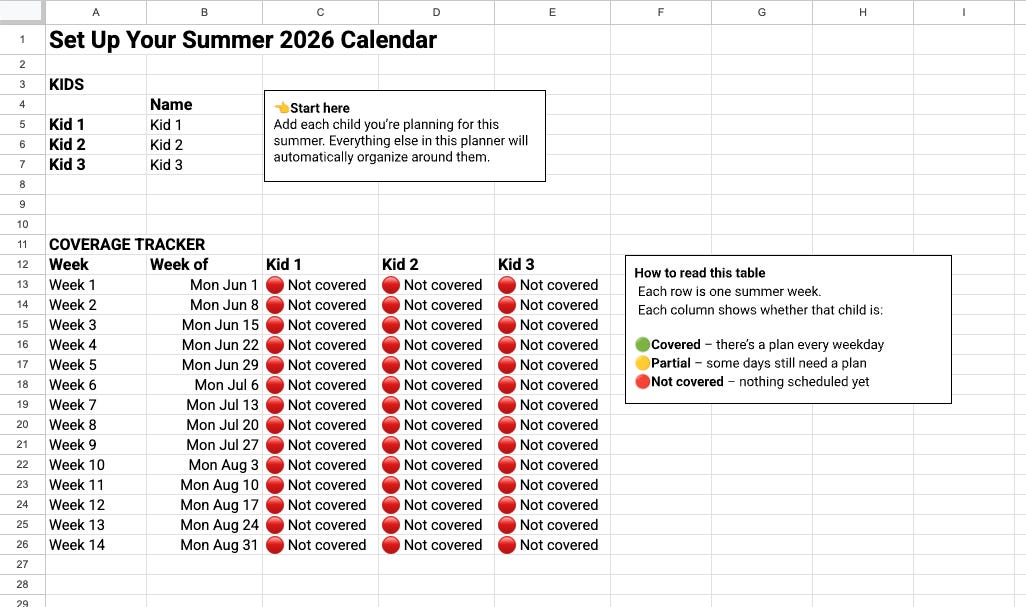
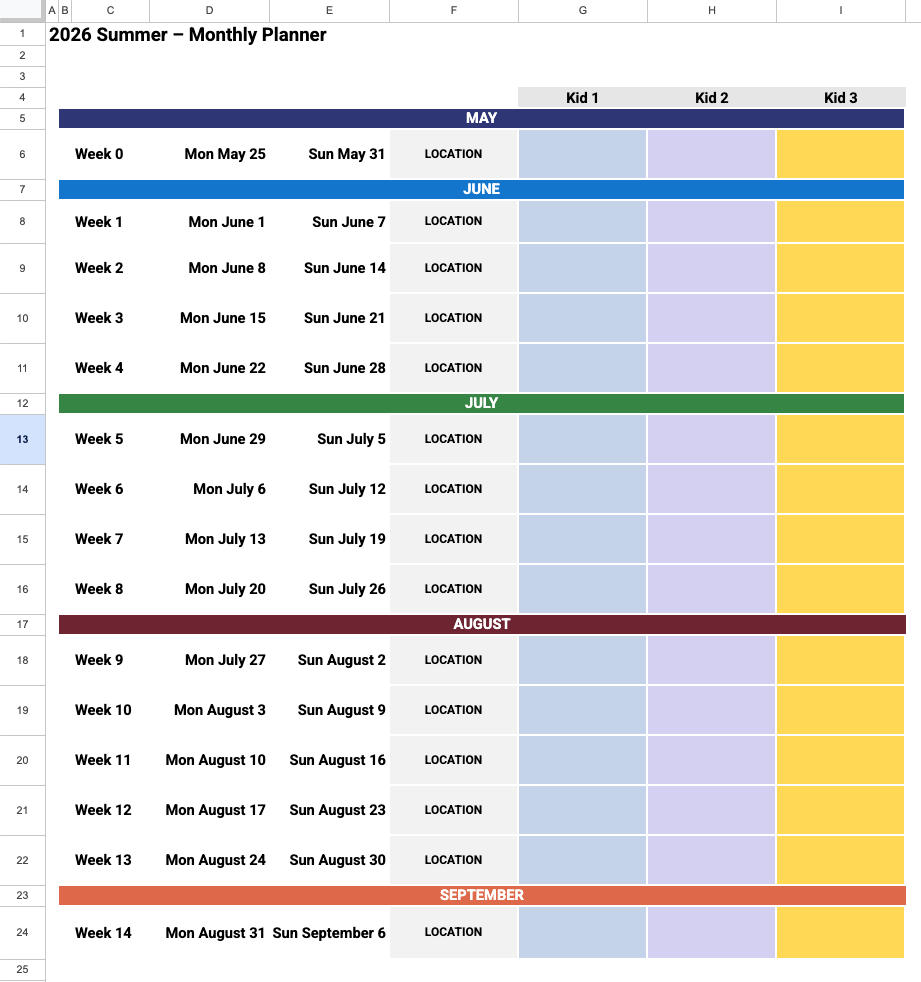
I’ve built a plug-and-play template that gives you both a weekly and a monthly view of your whole summer, plus a simple coverage tracker so you can instantly spot weeks where no one’s watching the kids (or where everyone’s suddenly double-booked). The tracker uses an at-a-glance red/yellow/green system so you don’t have to squint at tiny blocks of text to find the apocalypse.
This post is part of my Jump to Recipe series, where I’ll share practical, concrete moves that carve time out for what actually matters. I’m not selling you “wake up at 5am” optimism or a listicle of aspirational life-hacks. Instead, think NerdWallet for parent logistics: clear examples, real numbers, and the behind-the-scenes tactics other parents use. I’m highlighting the quiet operational instincts of the “glue parent” – the person who keeps the household functioning without ceremony – and show how those instincts scale with simple tools.
So with that in mind, let’s jump to the recipe.
Why we needed this
I made this because of the ritual many of us perform every January: resurrecting “SUMMER_MASTER_FINAL_FINAL2.xlsx,” opening three inbox threads, and gluing together camp PDFs, screenshots of registration windows, and scribbled notes from the room parent. Year after year the same thing happens, half the plan lives in the cloud, the other half in an Apple note labeled “summer,” and the rest in a text message thread you can only sometimes find if you can remember to search the right thing. I’ve made a template that treats summer like the small operational problem it is – not a crisis, just a badly managed Fyre Festival.
Template
This template is built out dependent on the number of kids you’re juggling this summer (fancy, I know). So simply click on the one that’s relevant to you, make a copy, and dive in.
One Kid Summer Planning Template
Two Kids Summer Planning Template
Three Kids Summer Planning Template
Four Kids Summer Planning Template
(If you have more than 4 kids, which would put up in an elite crew of just 5% of all parents – hats off to you, and comment on the post and I’ll shoot you a template built for your family).
How to use it
Add the kids. One row per child. That’s your map.
Paste any finalized plans (camp names, vacation weeks, etc.) and dates into the weekly planner.
Review the coverage tracker. Red means “someone needs watching”; green means “we’re civilized” and yellow means you’ve still got a couple of days in there to figure out.
If you’re in the Bay Area, use the Camp Directory tab to find ideas for open weeks, tip: you can sort by “sign up date” so you don’t miss the window for your kid’s favorite camps.
Add in the hours and note what to bring in the weekly planner so drop-offs aren’t an archaeological dig. Sunscreen, snack, costume, dignity, etc.
Three tiny rules that change everything
Sign up early for the camps you care about. Treat popular weeks like sought-after concert tickets – same paranoia, less neon. (idk why there’s a music festival theme going on here, except to say, parents signing up for summer camps would give Gen-zers trying to buy Coachella tickets a run for their money)
Keep one or two “soft” weeks with no permanent commitments, while childcare and activities are important, so are boredom and down time.
Prioritize camps and care that end within the same hour so pickups don’t require triage. A 3pm camper and a 6pm camper are not compatible on the same afternoon.
Godspeed.